

5 utm_medium Mistakes That Send Traffic to the Wrong GA4 Channel
Discover why non-standard utm_medium tags route your traffic to Unassigned in GA4. Learn the exact casing and syntax rules to maintain clean channel grouping.
Table of Contents
- Why utm_medium Governs GA4 Default Channel Grouping
- The 5 Critical utm_medium Mistakes
- 1. Inventing Custom Mediums (social-media, promoted)
- 2. Uppercase Letters (CPC, Email, Social)
- 3. Tagging Paid Ads as "social" Instead of "paid_social"
- 4. Using utm_medium=referral for Paid Partnerships
- 5. Blurring Display, Video, and Search Mediums
- GA4 Default Medium Compliance Cheat Sheet
- Frequently Asked Questions
In Google Analytics 4, utm_medium is the single most important parameter for report classification. If your medium does not conform to Google's strict regular expressions, your traffic is routed straight to Unassigned, blinding your attribution models.
Why utm_medium Governs GA4 Default Channel Grouping
GA4 evaluates traffic through an ordered rule set. When evaluating whether a session belongs in "Paid Search", "Paid Social", "Organic Social", or "Email", GA4 primarily inspects the value of Session medium. A single typographic error breaks the regex match.
The 5 Critical utm_medium Mistakes
1. Inventing Custom Mediums (social-media, promoted)
Marketing teams love inventing descriptive mediums like promoted-post, social-media, or influencer-blast. None of these exist in GA4's default definitions. Use standard values: cpc, paid_social, affiliate, or email.
2. Uppercase Letters (CPC, Email, Social)
In GA4, regular expressions for channel groups expect lowercase values. Setting utm_medium=CPC or utm_medium=Paid_Social fails the channel rule and dumps your ad spend into Unassigned.
3. Tagging Paid Ads as "social" Instead of "paid_social"
If you run Facebook Ads with utm_medium=social, GA4 categorizes the session as Organic Social. Your paid ad return appears non-existent, while organic social appears artificially massive.
4. Using utm_medium=referral for Paid Partnerships
Paid affiliate links or sponsored publisher placements tagged with utm_medium=referral blend into organic external web links. Use utm_medium=affiliate or utm_medium=cpc to keep paid partnerships isolated.
5. Blurring Display, Video, and Search Mediums
YouTube ads should use utm_medium=video. Display banner ads require utm_medium=display, banner, or cpm. Putting cpc on video ads confuses cross-channel reporting.
GA4 Default Medium Compliance Cheat Sheet
| Target GA4 Channel | Required utm_medium | Required utm_source |
|---|---|---|
| Paid Search | cpc or ppc | Source matches recognized search engine |
| Paid Social | paid_social, cpc, ppc | Source matches recognized social network |
email, newsletter, sendgrid | Any valid source | |
| Affiliates | affiliate | Any valid source |
Frequently Asked Questions
Can I use paidsocial without an underscore?
No. GA4 Default Channel Grouping specifically expects paid_social (with underscore) or matching regex variants. paidsocial falls into Unassigned.
How can I fix historical Unassigned traffic in GA4?
You cannot rewrite collected data, but you can build a Custom Channel Group in Admin > Data display > Channel groups that maps your past non-standard mediums into proper buckets.
Sources & Authoritative References
- Google Analytics 4 Default Channel Grouping Rule Definitions (Google Support)
Related Measurement Guides
15 UTM Tracking Mistakes That Ruin Your GA4 Data (and How to Fix Them)
Discover the 15 most destructive UTM tracking mistakes breaking GA4 attribution, causing Unassigned traffic, and corrupting ad ROI—with actionable fixes.
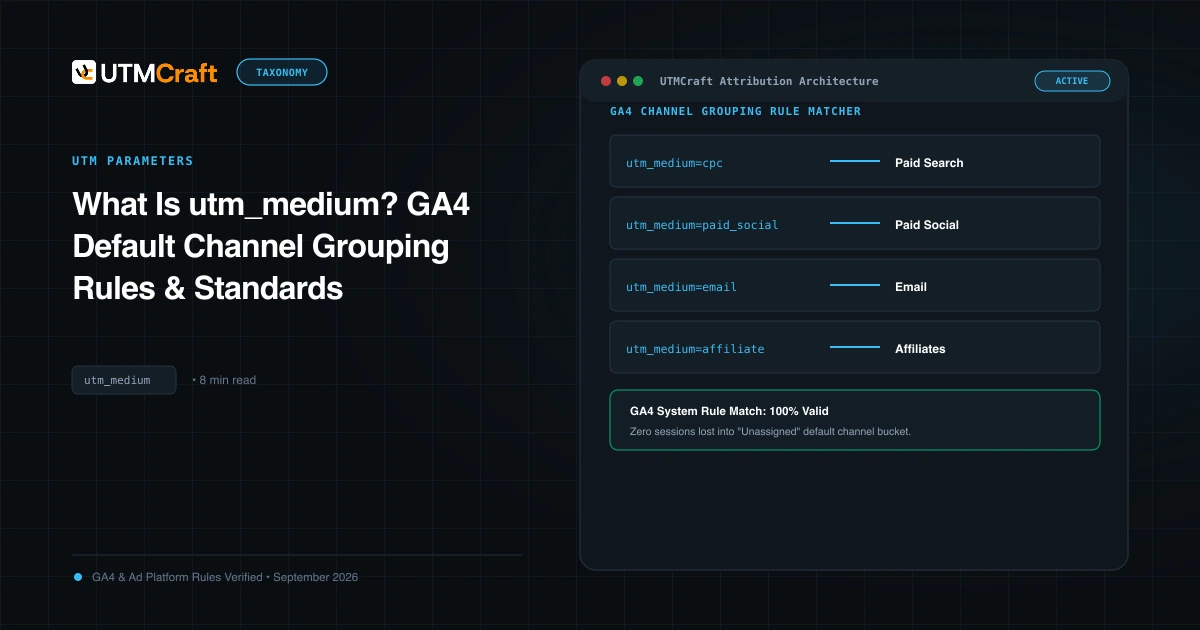
What Is utm_medium? GA4 Default Channel Grouping Rules & Standards
Understand utm_medium and how GA4 uses it to classify sessions into Default Channel Groups. Avoid Unassigned traffic with exact medium naming rules.
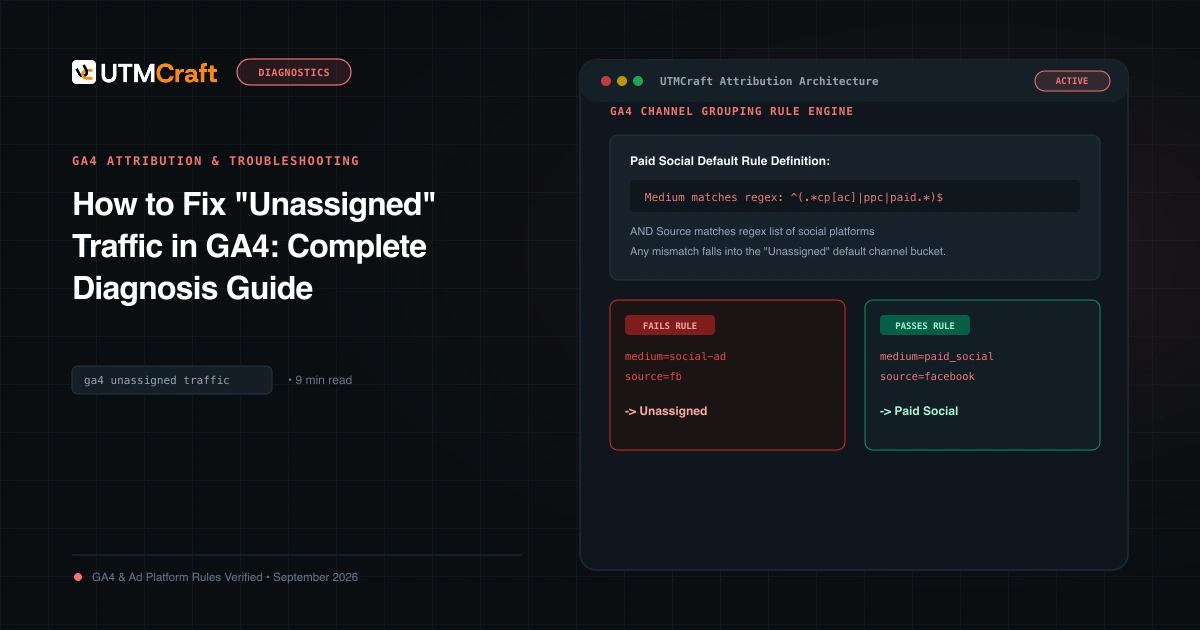
How to Fix "Unassigned" Traffic in GA4: Complete Diagnosis Guide
Why does GA4 show Unassigned traffic? Discover the exact channel grouping regex rules, common medium mistakes, and how to fix Unassigned traffic permanently.